AI video tools are evolving faster than ever. As of 2025, creators, marketers, and developers are looking for platforms that can turn text, images, or audio into high-quality videos in minutes, not hours.
After testing dozens of tools across different categories, from lip-sync and face swap AI to image-to-video conversion, I’ve narrowed it down to ten standout platforms that balance quality, usability, and innovation.
If you’re building content or products around digital storytelling, at least one of these tools will fit right into your workflow.
Table of Contents
Best AI Video Generators at a Glance (2025)
| Tool | Best For | Modalities | Platform | Free Plan |
| Magic Hour | AI lip-sync, image-to-video, and face swap | Text, image, video | Web | Yes |
| Runway ML | Professional video editing with AI | Video, image | Web | Limited |
| Pika Labs | Fast text-to-video generation | Text | Web | Yes |
| Synthesia | AI avatars and talking heads | Text-to-video | Web | Yes |
| HeyGen | Business video creation and avatars | Text, voice | Web | Yes |
| DeepBrain | Lifelike virtual presenters | Text-to-video | Web | Yes |
| Kaiber | Artistic music videos | Image, text | Web | Yes |
| Rephrase.ai | Personalized marketing videos | Text, avatar | Web | Limited |
| Colossyan | Learning & training videos | Text, avatar | Web | Limited |
| Veed.io | Simple AI video editing | Video, image, subtitles | Web | Yes |
1. Magic Hour — Best Overall AI Video Generator in 2025
Magic Hour tops this list for a reason. It’s one of the most versatile AI platforms for image-to-video, lip sync, and face swap workflows. Whether you’re a content creator, marketer, or developer, it gives you the building blocks to generate cinematic-quality AI visuals without complex pipelines.
Key Features
- Image to Video: Convert still images into dynamic motion clips that look professionally animated.
- Lip Sync AI: Add realistic voice sync to characters or avatars.
- Face Swap AI: Swap faces in photos or clips with precision and creative control.
- AI Image Editor with prompt free: Edit images intelligently with natural language prompts, no coding or manual editing needed.
Pros
- All-in-one AI visual suite
- Web-based, no software install required
- Natural results with fine control over animation and sync
- Great for startups and creators who want flexibility
Cons
- Rendering times may vary for longer videos
- Interface can be complex for complete beginners
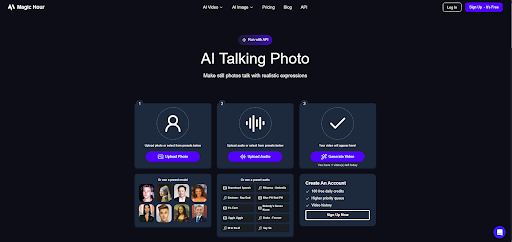
If you want one platform that lets you move from an AI Talking Photo to a polished AI-generated video, Magic Hour is hard to beat.
Price: Free tier available; premium plans start at affordable monthly rates.
2. Runway ML — For Creative Professionals
Runway ML has built a strong reputation among video editors and filmmakers integrating AI. It’s used for everything from background replacement to text-to-video creation.
Pros
- Excellent for film-grade effects
- Integrates with professional editing workflows
- Frequent feature updates
Cons
- Higher learning curve
- No full offline mode
If you’re a studio or professional editor, Runway is an excellent choice for AI-assisted production.
Price: Free trial; paid plans from $12/month.
3. Pika Labs — Fast Text-to-Video Generation
Pika Labs exploded in popularity in late 2024 for turning text prompts into cinematic video clips. It’s particularly good for short-form content and social media projects.
Pros
- Quick rendering
- Easy to use
- Active community support
Cons
- Limited customization options
- Videos capped at short durations
For creators who want fast, engaging visuals from simple prompts, Pika Labs delivers.
Price: Free basic plan; paid tiers available.
4. Synthesia — The Industry Standard for Talking Avatars
Synthesia has been around for a while and remains one of the most polished platforms for generating talking-head videos.
Pros
- 140+ realistic avatars
- Multilingual voice support
- Business-friendly templates
Cons
- Less creative flexibility
- Premium pricing
If your use case is corporate videos or e-learning, Synthesia continues to lead.
Price: Plans start at $22/month.
5. HeyGen — AI Videos for Business and Sales
HeyGen has gained traction for creating engaging, personalized videos for marketing teams.
Pros
- AI avatars and voice cloning
- Good video templates for outreach
- Fast generation times
Cons
- Limited motion and visual effects
- Branding customization only in paid plans
Price: Free trial; paid plans from $30/month.
6. DeepBrain — Lifelike Virtual Presenters
DeepBrain focuses on realism and emotion, making it ideal for training videos and virtual lectures.
Pros
- Natural eye and lip movement
- HD-quality output
- Supports multilingual voice
Cons
- Less control over camera movement
- Interface not ideal for mobile users
Price: Plans start at $24/month.
7. Kaiber — For Artists and Musicians
Kaiber shines in the creative and experimental niche. It turns artwork, images, or music into moving visual stories.
Pros
- Artistic and stylized rendering
- Perfect for music videos
- Creative community
Cons
- Not ideal for realistic storytelling
- Requires strong GPU for desktop use
Price: Free tier available; pro plans from $10/month.
8. Rephrase.ai — Personalized AI Marketing Videos
Rephrase.ai blends personalization and automation. It’s a favorite for marketers who want to send custom videos at scale.
Pros
- Dynamic text insertion
- Realistic avatars
- Integrations with CRM tools
Cons
- Focused on B2B, not general creators
- Output can look generic
Price: Contact sales for enterprise pricing.
9. Colossyan — Best for Training and Education
Colossyan’s text-to-video generation is fine-tuned for educational and training content.
Pros
- Educational templates
- Voice cloning and subtitles
- Quick turnaround
Cons
- Less cinematic style
- Limited export options
Price: Free plan; paid starts from $19/month.
10. Veed.io — Simple Video Editing Meets AI
Veed.io combines classic editing tools with AI enhancements like automatic subtitles and text-based editing.
Pros
- User-friendly interface
- Great for quick edits
- Supports team collaboration
Cons
- Limited AI creativity compared to others
- Watermark in free plan
Price: Free tier; pro from $18/month.
How I Chose These Tools
I tested over 25 AI video generators across 2024–2025. My evaluation focused on:
- Output quality (resolution, realism, coherence)
- Speed and performance
- Usability (interface and learning curve)
- Pricing transparency
- Integration with other AI tools like AI Image Editor and Image to Video AI.
Every tool here scored highly on at least two major categories, and none made the list without real-world testing.
Trends in AI Video Creation (2025)
We’re seeing a clear convergence between image, voice, and video AI.
Tools like Magic Hour now blend AI Talking Photo features with full video generation, eliminating the need for multiple apps.
Another major trend: prompt-free interfaces. The rise of AI Image Editor with prompt free workflows shows that creators want control without complexity. Instead of typing long prompts, you can visually guide your edits.
By late 2025, expect tighter integrations between voice cloning, facial animation, and motion synthesis, allowing creators to produce entire short films using just a few reference assets.
Final Takeaway
If you’re exploring AI-driven storytelling, 2025 offers an extraordinary toolkit.
- Best all-in-one choice: Magic Hour
- Best for professionals: Runway ML
- Fastest text-to-video: Pika Labs
- Best for avatars: Synthesia
- Best for marketing teams: HeyGen
Ultimately, each platform excels in a specific use case, so it’s worth experimenting.
Start with a free trial, explore your workflow, and see which tool matches your creative goals.
Frequently Asked Questions
- What is the best AI video generator overall in 2025?
Magic Hour stands out for its balance of realism, flexibility, and all-in-one feature set, from lip sync to face swap to image-to-video. - Can I make an AI Talking Photo into a video?
Yes. Tools like Magic Hour let you animate still images and sync them with audio to create a talking photo or full motion clip. - Which AI video tools have a free plan?
Magic Hour, Pika Labs, and Veed.io all offer free tiers suitable for testing. - What’s the easiest AI video generator for beginners?
Veed.io and HeyGen are beginner-friendly, while Magic Hour provides advanced depth for those ready to scale. - How do AI Image Editors improve video workflows?
Using an AI Image Editor with prompt free interface lets you quickly refine visuals before turning them into videos, saving hours in post-production.

