
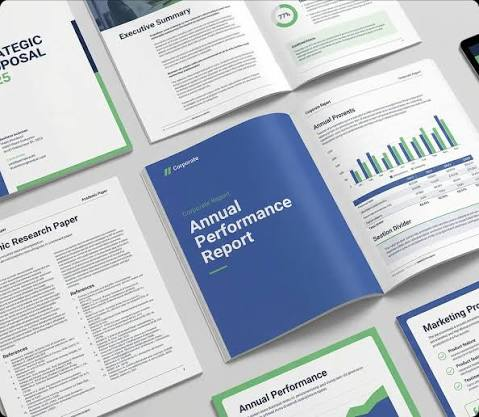
Corporate document design helps organisations present business information through clear, consistent, and purposeful visual choices. It brings typography, colour, layout, imagery, and brand elements together within one communication system. Effective design can make reports, proposals, presentations, and company profiles easier to read and understand. It also helps readers recognise important information and follow content in a logical order. This guide explains the main design elements, practical methods, and professional considerations involved in creating effective corporate documents for varied business purposes.
Table of Contents
What Is Corporate Document Design?
Business documents use visual presentation to organise written information and guide attention. Design establishes relationships between headings, body text, data, images, and supporting details. It creates a consistent appearance that reflects the purpose, audience, and identity of an organisation.
The approach can vary according to the document, audience, and communication goal. An annual report may emphasise data, while a proposal may highlight recommendations. Thoughtful design connects these requirements through suitable visual choices that support understanding and create a professional presentation.
What Are the Core Elements of Corporate Document Design?
Every visual element has a specific role in presenting information effectively. Combining these elements carefully creates documents that remain clear and visually consistent.
The main elements to consider include:
- Typography and Font Hierarchy: Readable typefaces and distinct heading levels help readers recognise sections and understand relationships between content.
- Colour Palette: A considered palette can distinguish sections, emphasise selected information, and connect documents with an established visual identity.
- Page Layout and Spacing: Balanced margins, alignment, columns, and white space organise content and give individual elements suitable room.
- Visual Hierarchy: Differences in size, weight, position, and spacing guide attention towards important information and establish a natural reading sequence.
- Images, Icons, and Graphics: Relevant visual elements can explain information, support written content, and make data easier to interpret.
- Brand Consistency: Consistent fonts, colours, logos, and graphic treatments create visual continuity across pages and related business materials.
Together, these elements create a unified design system that supports clear communication across different corporate document formats.
How to Design an Effective Corporate Document
A practical process connects content requirements with suitable visual decisions. Each stage should reflect the document’s purpose and intended audience.
Useful steps for corporate document design include:
- Identify the Purpose and Audience: Determine reader needs and choose content and presentation options that support them.
- Organise the Content: Arrange related information into logical sections that support a clear reading sequence.
- Create an Information Hierarchy: Use headings, type sizes, spacing, and placement to communicate the importance of different content.
- Apply Brand Elements: Incorporate approved colours, typefaces, logos, and graphic conventions appropriately throughout the document.
- Maintain Page-to-Page Consistency: Repeat relevant layout patterns, heading treatments, and spacing conventions to create a connected experience.
- Review Readability and Presentation: Examine text, graphics, alignment, spacing, and page flow within the intended viewing format.
Following these steps provides a practical way to turn business information into an accessible, visually coherent document.
How to Adapt Corporate Documents for Different Formats
Corporate documents may appear in print, on screens, or during presentations. Each format benefits from design choices suited to its viewing environment.
Useful format considerations include:
- Printed Documents: Select suitable page dimensions, margins, image quality, and text sizes to support comfortable reading on paper.
- Digital Documents: Use clear navigation, readable screen typography, and suitable page proportions to make electronic documents easy to follow.
- Presentations: Keep individual slides focused and use visual hierarchy to help audiences understand information while listening to the speaker.
- Data-Heavy Reports: Present tables, charts, headings, and supporting explanations in ways that help readers locate and interpret information efficiently.
- Downloadable Documents: Consider common screen sizes and file usability so readers can access information across suitable devices and viewing environments.
Adapting design decisions to the intended format helps the document support its purpose and expected reading experience.
When Should You Consider Professional Design Support?
Professional design support suits documents with extensive information, detailed data visualisation, or multiple visual requirements. Specialists can develop repeatable page systems and graphic conventions for recurring reports, proposals, presentations, and other important business communication materials used across various organisational settings.
A branding and creative agency can align document presentation with an organisation’s wider visual identity. This approach can connect typography, colour, imagery, and layout while ensuring each document clearly reflects its audience, purpose, format, and communication requirements across relevant business materials.
Conclusion
Effective corporate documents combine clear information with purposeful visual presentation. Typography, colour, spacing, hierarchy, imagery, and branding each contribute to an accessible reading experience. A logical design process helps these elements work together while supporting specific communication goals. Adapting design choices for different formats can further support how readers access and understand information. By considering audience, purpose, content, format, and brand requirements, organisations can create professional documents that communicate clearly and provide a consistent visual experience across business settings.